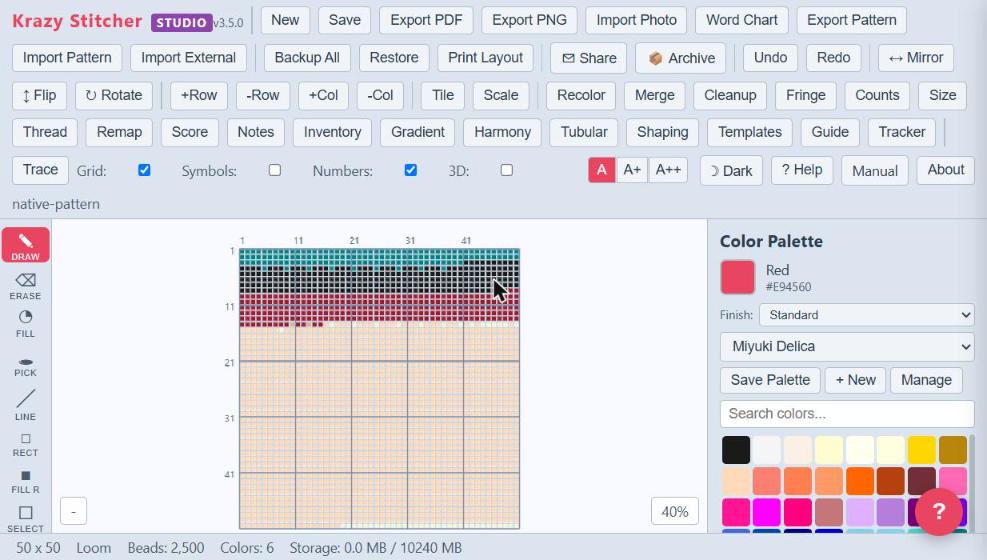
Krazy Stitcher Studio is the complete bead design environment for power users, pattern sellers, and professional designers. It includes every feature in Pro — all 25 stitch types, brand remapping, inventory tracking, difficulty scoring, SVG/CSV export, a rotatable 3D preview, Color Reduction, 300 DPI hi-res export, Enhanced Backup (Version History), and the full toolkit — plus a suite of advanced capabilities that no other bead software offers at any price. The color harmony engine analyzes your palette and suggests complementary, analogous, and triadic alternatives. The templates library gives you 66 starter designs across geometric, nature, holiday, and alphabet categories, so you never start from a blank canvas unless you want to.
Studio's advanced layer system lets you build complex multi-layer patterns with independent visibility, opacity, and lock controls — essential for designs that overlay text on backgrounds or combine multiple motifs. The pattern scale tool resizes your work while preserving color relationships, and the multi-pattern workspace lets you have several designs open simultaneously for side-by-side comparison. Import CSV and plain-text hex grids, open OXS cross-stitch files, and bring patterns from other programs across as a picture with Import Photo, so you can bring your existing library into Krazy Stitcher without starting over. The stitch-along autoplay walks you through your pattern bead by bead in the correct stitching order — a built-in teacher for learning new stitch types. Batch Export bundles PDF/PNG output for multiple saved patterns into a single .zip download, exclusive to Studio. Batch Photo Import runs the other direction — convert a whole folder of photos into separate patterns in one pass, using the same conversion settings as a single import. Working on something oversized? Split & Recompose divides a large pattern into a grid of tiles you can work on one at a time, then recombines them into the finished whole — included in Pro as well, but especially handy here for Studio's oversized, professional-scale projects. All of this runs in your browser, works offline after your first visit, and costs less than a single tube of Miyuki Delicas. Keep every pattern as its own file in a folder you choose — Krazy Stitcher never stores your patterns, so keep them safe in your own Dropbox, Google Drive or OneDrive folder and they follow you to any browser or computer — and press Ctrl+K to find any tool in seconds.
See all features in the edition table