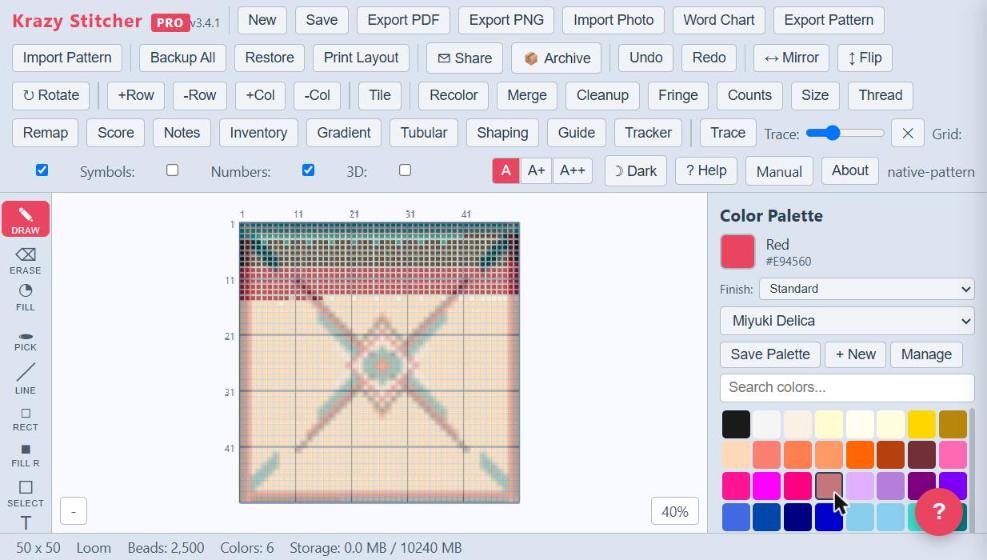
Krazy Stitcher Pro takes everything in Essentials and pushes it into professional territory. All 25 stitch types are unlocked, including Ladder Stitch, Albion Stitch, and Bead Crochet Rope — the three stitch types exclusive to Pro and Studio — on top of the full Essentials lineup (peyote, brick, loom, herringbone, square, gourd, RAW, spiral rope, Dutch spiral, netting, shaped peyote, and Ndebele). Palette brand remapping lets you convert every color in your pattern from Miyuki to Toho to Preciosa with a single click, so you can shop the brand that's in stock. The built-in bead inventory tracker and cost estimator means you know exactly what you need and what it will cost before you start. 300 DPI hi-res export means your PDFs and PNGs print exactly as designed. And when you need your pattern in another tool, native SVG and CSV export means your work isn't locked in — open it in Illustrator, Inkscape, or a spreadsheet without a third-party converter. When you want to see it before you stitch it, a rotatable 3D Preview places your beads with the real geometry of the active stitch type — peyote's offset rows, herringbone's angled pairs, even gourd and crochet rope wrapped into an actual tube.
Pro adds the tools that separate a casual beader from a serious designer. Gradient fill creates smooth color transitions across your pattern. The difficulty scoring system rates your design from 0 to 100 based on size, color count, stitch complexity, and confetti density. Recolor, merge, and confetti cleanup tools let you refine photo imports until they're clean and stitchable. Enhanced Backup keeps an automatic, rolling Version History of the pattern you're working on (with optional folder auto-export on Chrome/Edge) on top of Essentials' manual Backup All / Restore. The fringe editor, tubular stitch support, row-by-row work tracker, pattern notes, tiling and repeat mode, and print layout with pagination round out a toolkit that rivals desktop apps costing twice the price — all running in your browser with no installation required. Keep every pattern as its own file in a folder you choose — Krazy Stitcher never stores your patterns, so keep them safe in your own Dropbox, Google Drive or OneDrive folder and they follow you to any browser or computer — and press Ctrl+K to find any tool in seconds.
See all features in the edition table